Keep QuickBooks. Add the construction layer it's missing.
Stak adds the construction project accounting QuickBooks was never built for — job costing, budget-to-actuals with change orders isolated, AI invoice processing, and client-ready bills — then syncs it all back to QuickBooks Desktop or Online. Live in under an hour, no rip-and-replace.
Searching for a QuickBooks alternative?
You don't need one.
QuickBooks is great at the books. It was just never built for the way contractors bill. Here's the gap — and the layer Stak adds on top.
- Clunky change orders
- Managing change orders in QuickBooks is inefficient and manual. Stak streamlines them — tracked, e-signed, and isolated from budgeted work.
- Markup & tax, automatic
- Tracking markups across projects by hand is hard and error-prone. Stak tracks and calculates markup for you automatically, and keeps sales tax up to date.
- B2A that counts change orders
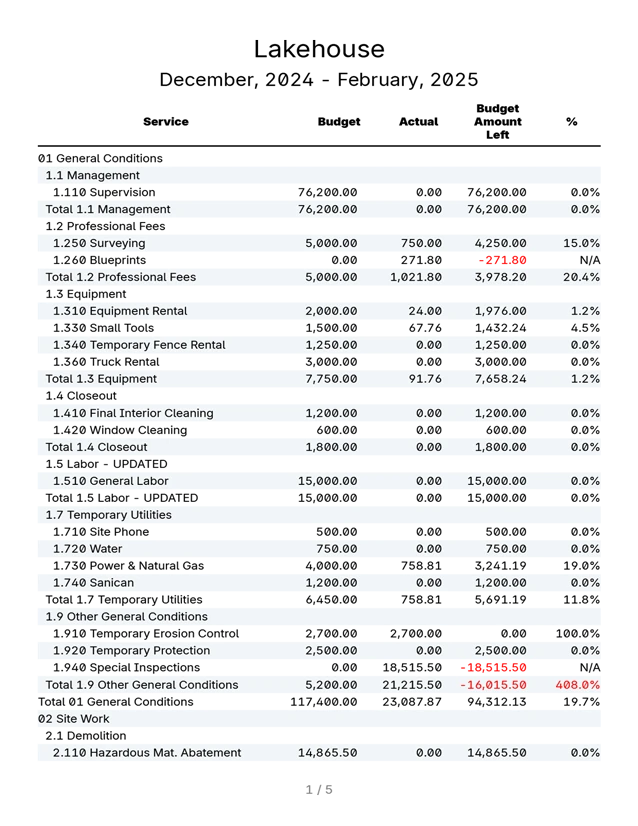
- Standard budget-to-actuals reports lump change-order work into “actuals” — inflating overages against the original budget and muddying the picture. Stak’s B2A separates them, so overages reflect reality.
- Beyond what QuickBooks does
- QuickBooks doesn’t offer advanced AI document processing and cost prediction, lien-release tracking, in-depth vendor and customer communication, or custom reporting. Stak does.
QuickBooks Alone vs. QuickBooks + Stak
Two-way sync. You stay in control.
Here's exactly how Stak and QuickBooks work together.
- Reads in, writes back
- The sync runs both directions — Stak reads from QuickBooks and writes your finished work back — so nothing lives in two places.
- Respects your QuickBooks records
- Your books stay the single source of truth. Stak works with your existing QuickBooks records rather than replacing them.
- You control every sync
- Nothing moves without your say-so — you decide what syncs.
- No sensitive personal data
- Stak never shares credit card numbers, bank account details, or Social Security numbers.
Set up fast. Bill the same day.
Getting started doesn't mean starting over. Connect, bring your projects across, and send your first client-ready bill — in the time it takes to grab a coffee.
- 1
Connect QuickBooks
Link Stak to QuickBooks Desktop or QuickBooks Online. No rip-and-replace — your books stay exactly where they are.
- 2
Bring your projects in
Your jobs come across so you start from where you already are, not a blank slate.
- 3
Send your first bill
Produce a client-ready bill with budgeted work and change orders separated — the same day you start.
The Best Builders Love the Stak Experience
Named builders run their monthly billing on Stak — on top of the QuickBooks they already keep.
“Stak has been a super effective tool at streamlining our monthly invoice review and billing procedures. The platform is highly intelligent and user friendly and has become our go-to software for managing the financial side of the business, which has improved organization, communication and work flow on all of our projects.”

Colin Anderson
CCM at Hamish Anderson Custom Homes, Inc.


QuickBooks & Stak — Common Questions
See Stak run on top of your QuickBooks.